L1回滚合并与提案失效
回滚先找历史正文,再创建新版本
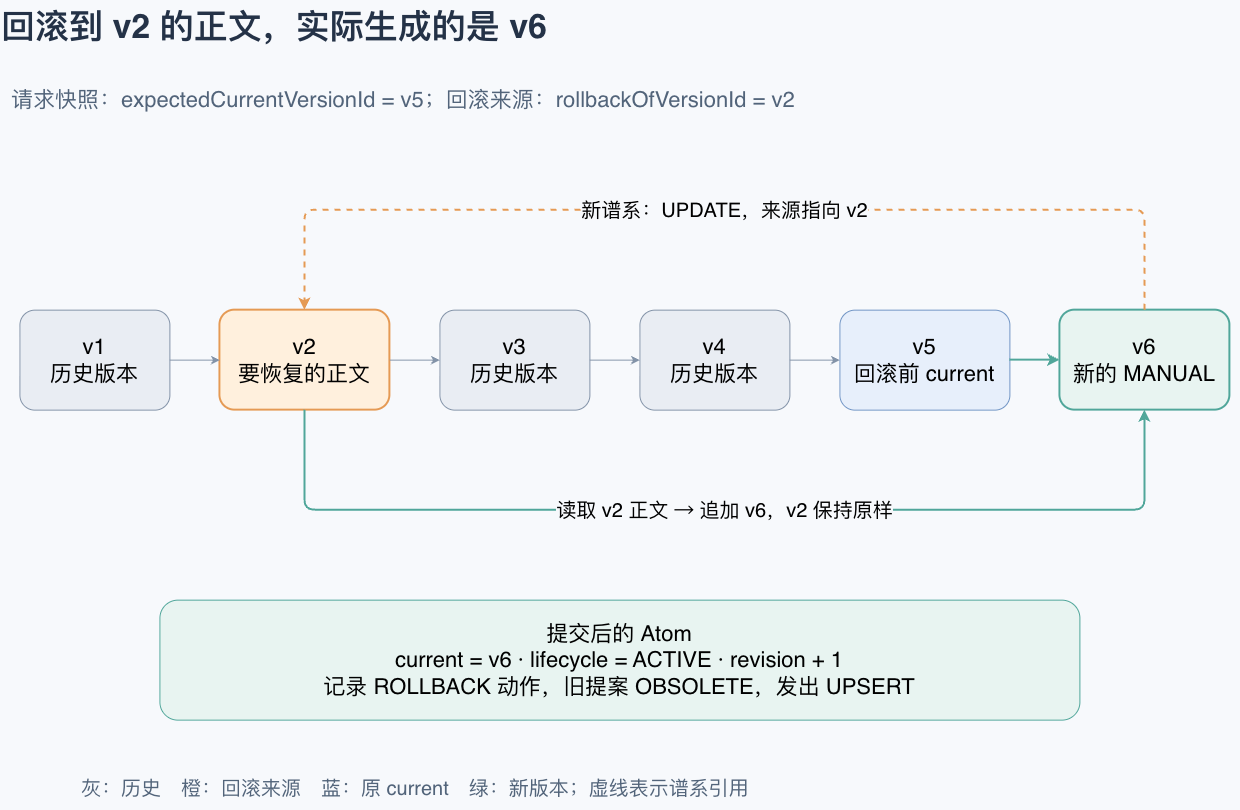
回滚请求同时带两组版本信息:
expectedCurrentVersionId表示用户提交时看到的当前版本,用来做并发校验;rollbackOfVersionId表示想恢复哪一版正文。
后端不会把历史版本直接重新设为 current。它读取历史正文,复制出一个新的 MANUAL 版本,并让新版本引用旧版本作为谱系来源。下面贴出 rollback() 的完整方法:
/** 复制指定历史版本的正文作为新版本;原历史版本与版本号保持不变。 */
private Result rollback(Rollback command, String operation, String fingerprint) {
    // 回滚目标仍是当前 Atom;rollbackOf 只是要复制正文的历史版本。
    L1AtomSnapshot current = requireTarget(command.target(), true);
    if (current.lifecycle() == L1AtomLifecycle.DELETED) {
        throw failure(MemoryGovernanceErrorCode.INVALID_LIFECYCLE);
    }
    // 只允许使用当前 Atom 自己的历史版本,不能把其他 Atom 的版本借来回滚。
    MemoryVersionSnapshot rollbackOf = facts.versions(current.atomId()).stream()
            .filter(version -> version.versionId().equals(command.rollbackOf()))
            .findFirst()
            .orElseThrow(() -> failure(MemoryGovernanceErrorCode.VERSION_NOT_FOUND));
    Instant now = clock.instant();
    long versionNumber = nextVersionNumber(current.atomId());
    MemoryVersionId versionId = new MemoryVersionId(UuidCreator.getTimeOrderedEpoch());
    MemoryLineageId lineageId = new MemoryLineageId(UuidCreator.getTimeOrderedEpoch());
    List<MemoryLineageSource> sources = List.of(new MemoryLineageSource.MemoryVersion(command.rollbackOf()));
    // 旧版本本身保持不变:复制它的正文,生成一个新的 MANUAL 版本和版本号。
    persistVersion(
            versionId, current.atomId(), current.memoryAssetId(), versionNumber, rollbackOf.content(),
            MemoryVersionProvenance.MANUAL, now);
    persistManualLineage(
            lineageId, current.memoryAssetId(), versionId, L1EvolutionDecision.UPDATE,
            command.context().principal().userId(), sources, now);
    int changed = jdbc.sql("update memory_evolution.l1_atom set current_version_id = ?, lifecycle = 'ACTIVE', "
                    + "revision = ?, changed_at = ? where atom_id = ? and memory_asset_id = ? and revision = ? "
                    + "and current_version_id = ? and lifecycle <> 'DELETED'")
            .params(versionId.value(), current.revision() + 1, Timestamp.from(now), current.atomId().value(),
                    current.memoryAssetId().value(), current.revision(), current.currentVersionId().value())
            .update();
    if (changed != 1) {
        throw failure(MemoryGovernanceErrorCode.STALE_ATOM);
    }
    L1AtomSnapshot atom = new L1AtomSnapshot(
            current.atomId(), current.memoryAssetId(), current.type(), versionId, L1AtomLifecycle.ACTIVE,
            current.revision() + 1, current.createdAt(), now);
    MemoryVersionSnapshot version = new MemoryVersionSnapshot(
            versionId, current.atomId(), current.memoryAssetId(), versionNumber, rollbackOf.content(),
            MemoryVersionProvenance.MANUAL, now);
    MemoryLineageSnapshot lineage = new MemoryLineageSnapshot(
            lineageId, current.memoryAssetId(), versionId, L1EvolutionDecision.UPDATE, sources,
            new MemoryLineageOrigin.Manual(command.context().principal().userId()), now);
    UUID actionId = UuidCreator.getTimeOrderedEpoch();
    insertReceipt(command, operation, fingerprint, atom, Optional.of(version), Optional.of(lineage),
            Optional.of(actionId), Optional.empty());
    L1ManualActionSnapshot action = insertAction(
            command, actionId, L1ManualActionType.ROLLBACK, atom, command.reason(), now);
    List<MemoryProposalId> obsoleted = obsoletePending(
            current.atomId(), current.currentVersionId(), command.context().principal().userId(),
            command.reason(), command.context().idempotencyKey(), now, Optional.empty());
    append(atom, MemoryProjectionSource.Operation.UPSERT, command.context().correlationId(), now);
    jdbc.sql("set constraints all immediate").update();
    return new Result(atom, Optional.of(version), Optional.of(lineage), Optional.empty(), Optional.of(action),
            List.of(), obsoleted);
}
这里有三个容易看错的点。
第一,回滚一个 INVALIDATED Atom 会把它恢复为 ACTIVE。SQL 明确写了 lifecycle = 'ACTIVE',只排除已经 DELETED 的 Atom。
第二,新版本的 provenance 是 MANUAL,谱系 decision 是 UPDATE,来源是 rollbackOf 指向的历史版本。以后查看历史时,能分清“当年生成的旧版本”和“这次由用户执行回滚产生的新版本”。
第三,版本号继续递增。假设当前是 v5,回滚到 v2 的正文,结果是 v6,v2 到 v5 都不会被覆盖或改号。
回滚还会写 L1ManualActionType.ROLLBACK,保存用户填写的原因。随后,绑定回滚前 current 版本的提案会转成 OBSOLETE,检索投影收到新版本的 UPSERT。
付费内容提示
该文档的全部内容仅对「码力全开」项目实战&技术讲解 知识星球用户开放
加入星球,一次获得完整项目资料、全栈技术知识库和长期答疑服务。
100万+字全栈技术知识库深入讲解技术核心、数据库、中间件和分布式等内容
9套热门的实战项目持续更新的企业级项目覆盖高并发、微服务、数据中台 和 AI Agent 等方向
AI 技术知识大模型面试详解覆盖 AI 模型原理、Agent、RAG、MCP、Skills、Harness 等核心知识点
文档 + 视频两种讲解形式既能系统阅读,也能跟随视频理解核心业务
完整项目实战资料
每套项目均包含从 0 到 1 讲解文档核心业务讲解视频从基础项目到复杂业务场景,项目资料会持续更新。
- 01Nexus Agent AI 智能体
- 02Nexus Agent Pro 完全版
- 03Agent Up Memory
- 04黑马点评Plus
- 05大麦
- 06大麦Pro
- 07大麦AI
- 08流量切换
- 09数据中台
加入后还能获得
进入星球后,即可享受上述所有服务,保证不会再有其他隐藏费用。从学习、面试到项目启动,都可以继续获得支持。
- 1 对 1 解答项目和技术问题都可以提问
- 针对性补充没有讲清楚的内容会继续补充
- 面试与简历指导梳理回答技巧和项目亮点
- 中间件云环境项目依赖可以直接接入使用
- 面试后复盘被问住的问题可以继续交流
- 远程问题解决项目启动问题可协助排查