结构化输出深度剖析
大模型的输出是自然语言文本,格式不固定。如果是人类阅读没问题,但程序处理起来就麻烦了。
比如你问模型"推荐几本书",它可能这样回答:
我给你推荐三本不错的书:
1.《代码整洁之道》- 讲代码规范的经典之作
2.《设计模式》- 四人组的名著
3.《重构》- Martin Fowler的代表作
这种格式人读着没问题,但你想用代码解析出书名、作者,就得写正则或者其他脏活累活。
结构化输出就是让模型按指定格式返回,比如直接返回JSON,甚至直接转成Java对象。今天我们来深入聊聊Spring AI是怎么实现的。
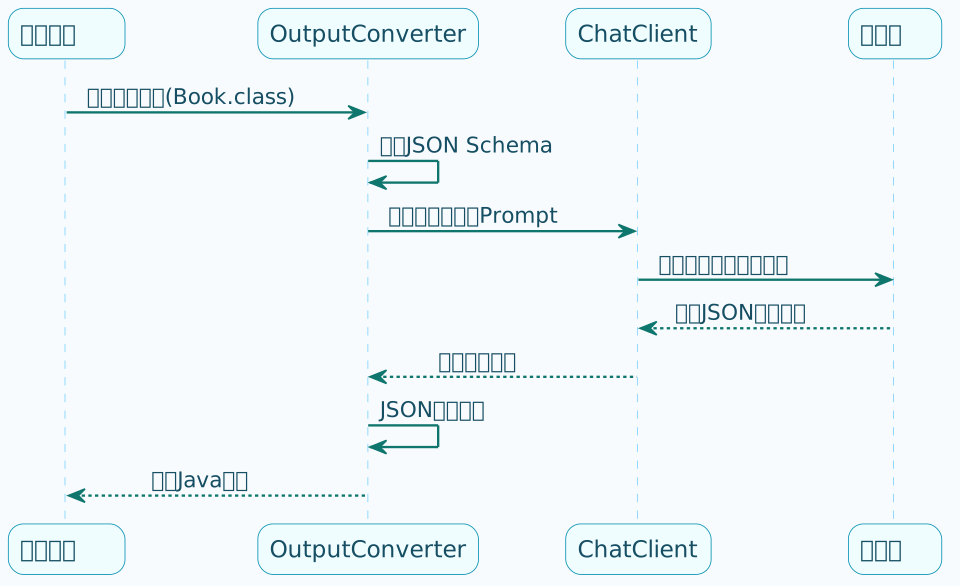
Spring AI 的结构化输出机制分两步:
- 调用前:根据目标 Java 类自动生成 JSON Schema,注入到提示词中,告诉模型要按什么格式输出
- 调用后:把模型返回的 JSON 文本反序列化成目标 Java 类型
结构化输出的基本原理
Spring AI的结构化输出机制,核心思想是:
- 调用前:往提示词里注入格式说明,告诉模型要按什么格式输出
- 调用后:把模型返回的文本解析成目标类型
StructuredOutputConverter接口
Spring AI定义了一个统一的接口来处理结构化输出:
public interface StructuredOutputConverter<T> extends Converter<String, T>, FormatProvider {
// 继承自Converter: 把字符串转成目标类型
// T convert(String source)
// 继承自FormatProvider: 获取格式说明文本
// String getFormat()
}
这个接口有几个实现类:
| 实现类 | 用途 |
|---|---|
| BeanOutputConverter | 转成Java Bean |
| ListOutputConverter | 转成List |
| MapOutputConverter | 转成Map |
其中BeanOutputConverter是最常用的。
BeanOutputConverter源码剖析
getFormat()方法
先来看看BeanOutputConverter是怎么生成格式说明的:
@Override
public String getFormat() {
String template = """
Your response should be in JSON format.
Do not include any explanations, only provide a RFC8259 compliant JSON response following this format without deviation.
Do not include markdown code blocks in your response.
Remove the ```json markdown from the output.
Here is the JSON Schema instance your output must adhere to:
```%s```
""";
return String.format(template, this.jsonSchema);
}
翻译一下这段提示词:
- 你的回答必须是JSON格式
- 不要包含任何解释,只输出符合RFC8259的JSON
- 不要包含markdown代码块
- 必须遵循下面的JSON Schema
关键在this.jsonSchema,它是根据你传入的Java类自动生成的。
JSON Schema生成
假设我们有这样一个record:
public record Product(
@JsonPropertyDescription("商品ID") String productId,
@JsonPropertyDescription("商品名称") String name,
@JsonPropertyDescription("价格,单位元") BigDecimal price,
@JsonPropertyDescription("商品描述") String description
) {}
BeanOutputConverter会把它转成这样的JSON Schema:
{
"$schema": "https://json-schema.org/draft/2020-12/schema",
"type": "object",
"properties": {
"productId": {
"type": "string",
"description": "商品ID"
},
"name": {
"type": "string",
"description": "商品名称"
},
"price": {
"type": "number",
"description": "价格,单位元"
},
"description": {
"type": "string",
"description": "商品描述"
}
},
"required": ["productId", "name", "price", "description"]
}
大模型收到这个Schema后,就知道应该按什么结构输出了。
convert()方法
模型返回JSON文本后,需要反序列化成Java对象:
@Override
public T convert(@NonNull String text) {
try {
// 去除首尾空白
text = text.trim();
// 处理markdown代码块(有些模型会自作聪明加上```json)
if (text.startsWith("```") && text.endsWith("```")) {
String[] lines = text.split("\n", 2);
if (lines[0].trim().equalsIgnoreCase("```json")) {
text = lines.length > 1 ? lines[1] : "";
} else {
text = text.substring(3);
}
text = text.substring(0, text.length() - 3).trim();
}
// 使用Jackson反序列化
return (T) this.objectMapper.readValue(text,
this.objectMapper.constructType(this.type));
} catch (JsonProcessingException e) {
throw new RuntimeException("JSON解析失败: " + text, e);
}
}
可以看到,它还贴心地处理了markdown代码块的情况。
部分大模型会"自作主张"在 JSON 输出前后加上 ```json 的 markdown 标记。BeanOutputConverter 在 convert() 方法中会自动识别并剥离这些标记,保证 JSON 解析不会失败。
手动使用BeanOutputConverter
来看看怎么在代码里使用:
@RestController
@RequestMapping("/structured")
public class StructuredOutputController {
private final ChatClient chatClient;
@GetMapping("/product")
public String getProduct(@RequestParam String category) {
// 1. 创建Converter
BeanOutputConverter<Product> converter = new BeanOutputConverter<>(Product.class);
// 2. 构建包含格式说明的提示词
PromptTemplate template = new PromptTemplate("""
请为"{category}"类目生成一个虚构的商品信息。
{format}
""");
Prompt prompt = template.create(Map.of(
"category", category,
"format", converter.getFormat() // 注入格式说明
));
// 3. 调用模型获取JSON
String jsonResult = chatClient.prompt(prompt)
.call()
.content();
// 4. 转成Java对象
Product product = converter.convert(jsonResult);
System.out.println("商品名称: " + product.name());
System.out.println("价格: " + product.price());
return jsonResult;
}
}
entity()方法:更简洁的写法
手动使用Converter有点繁琐,Spring AI提供了更简洁的写法——entity()方法:
@GetMapping("/product-simple")
public String getProductSimple(@RequestParam String category) {
Product product = chatClient.prompt("为" + category + "类目生成一个虚构商品")
.call()
.entity(Product.class); // 一步到位
return product.toString();
}
一个方法搞定,内部自动完成了格式注入和反序列化。
entity()源码追踪
来看看它是怎么实现的:
// ChatClient.CallResponseSpec
@Nullable
public <T> T entity(Class<T> type) {
Assert.notNull(type, "type cannot be null");
// 创建Converter
BeanOutputConverter<T> outputConverter = new BeanOutputConverter<>(type);
// 调用实际处理方法
return this.doSingleWithBeanOutputConverter(outputConverter);
}
private <T> T doSingleWithBeanOutputConverter(StructuredOutputConverter<T> outputConverter) {
// 1. 发起调用,把格式说明注入到请求中
ChatResponse chatResponse = this.doGetObservableChatClientResponse(
this.request,
outputConverter.getFormat() // 关键:注入格式说明
).chatResponse();
// 2. 提取文本响应
String stringResponse = getContentFromChatResponse(chatResponse);
// 3. 转换成目标类型
return (stringResponse == null) ? null : outputConverter.convert(stringResponse);
}
核心就两步:
- 把
getFormat()的内容注入到请求里 - 把响应文本用
convert()转成对象
使用@JsonPropertyDescription增强准确性
如果你发现输出的字段不够准确,可以用注解给字段加上描述:
public record OrderInfo(
@JsonPropertyDescription("订单编号,格式为ORD开头的12位字符串")
String orderId,
@JsonPropertyDescription("订单状态:PENDING-待支付, PAID-已支付, SHIPPED-已发货, COMPLETED-已完成")
String status,
@JsonPropertyDescription("订单总金额,保留两位小数")
BigDecimal totalAmount,
@JsonPropertyDescription("下单时间,ISO 8601格式")
String createTime,
@JsonPropertyDescription("收货人姓名")
String receiverName
) {}
这些描述会被包含在JSON Schema里,帮助模型更准确地生成数据。
转换成List
如果需要返回多个对象怎么办?用ParameterizedTypeReference:
@GetMapping("/products")
public String getProducts(@RequestParam String category) {
List<Product> products = chatClient.prompt(
"为" + category + "类目生成3个虚构商品")
.call()
.entity(new ParameterizedTypeReference<List<Product>>() {});
products.forEach(p ->
System.out.println(p.name() + " - ¥" + p.price()));
return products.toString();
}
注意:不能直接写List.class,必须用ParameterizedTypeReference包装,否则泛型信息会丢失。
Java 泛型在运行时会被擦除,直接传 List.class 无法知道列表的元素类型。必须使用 new ParameterizedTypeReference<List<Product>>() {} 的匿名子类写法来保留完整的泛型类型信息。
转换成Map
Map的转换稍微复杂一点,Spring AI提供了MapOutputConverter,但它只能转成Map<String, Object>:
@GetMapping("/product-map")
public Map<String, Object> getProductAsMap(@RequestParam String category) {
return chatClient.prompt("""
为%s类目生成一个商品,包含productId、name、price、description字段
""".formatted(category))
.call()
.entity(new MapOutputConverter());
}
如果需要更精确的Map结构,建议在提示词里明确说明:
@GetMapping("/category-products")
public Map<String, Object> getCategoryProducts() {
return chatClient.prompt("""
生成一个商品分类Map,格式如下:
{
"电子产品": {"count": 数量, "topSeller": "热销商品名"},
"服装": {"count": 数量, "topSeller": "热销商品名"},
"食品": {"count": 数量, "topSeller": "热销商品名"}
}
""")
.call()
.entity(new MapOutputConverter());
}
流式调用不支持结构化输出
流式调用(stream)不支持 entity()。流式输出是分段返回的,无法保证每段都是有效的完整 JSON。如果需要结构化输出,必须使用同步调用(call())。
// 这样是不行的!
chatClient.prompt("xxx")
.stream()
.entity(Product.class); // 编译通过,但运行会出问题
处理复杂嵌套结构
结构化输出支持嵌套对象:
public record Order(
String orderId,
Customer customer, // 嵌套对象
List<OrderItem> items, // 嵌套列表
BigDecimal totalAmount
) {}
public record Customer(
String customerId,
String name,
String phone
) {}
public record OrderItem(
String productId,
String productName,
int quantity,
BigDecimal price
) {}
使用方式和简单对象一样:
Order order = chatClient.prompt("生成一个包含3个商品的模拟订单")
.call()
.entity(Order.class);
常见问题排查
遇到解析失败时,先用 .call().content() 打印原始响应内容,看看模型实际返回了什么。常见问题:
- 模型返回了额外的解释文字(需要在提示词中更强调"只输出JSON")
- 返回的 JSON 格式不正确
- 包含了 markdown 代码块(
BeanOutputConverter会自动处理,但若自行解析则需注意)
字段值不准确时,用 @JsonPropertyDescription 添加详细的字段描述,帮助模型理解字段的含义和格式要求。
小结
这篇文章深入剖析了Spring AI的结构化输出机制:
- 原理:通过JSON Schema告诉模型期望的输出格式
- BeanOutputConverter:核心转换器,负责格式注入和反序列化
- entity()方法:简化的API,一步完成结构化输出
- List/Map转换:用ParameterizedTypeReference处理泛型
- 限制:流式调用不支持结构化输出
掌握结构化输出,你的AI应用就能和业务代码无缝衔接了。下一篇我们来聊聊Advisor拦截器机制。